Features · For employees

Sleep, heart rate and weight, next to the step count.

An employee health metrics tracking platform where the update is the log. Change a weight, record a blood pressure, and an activity entry is written for you. No second app, no duplicate form.
Full Mode only Mobile app No wearable required
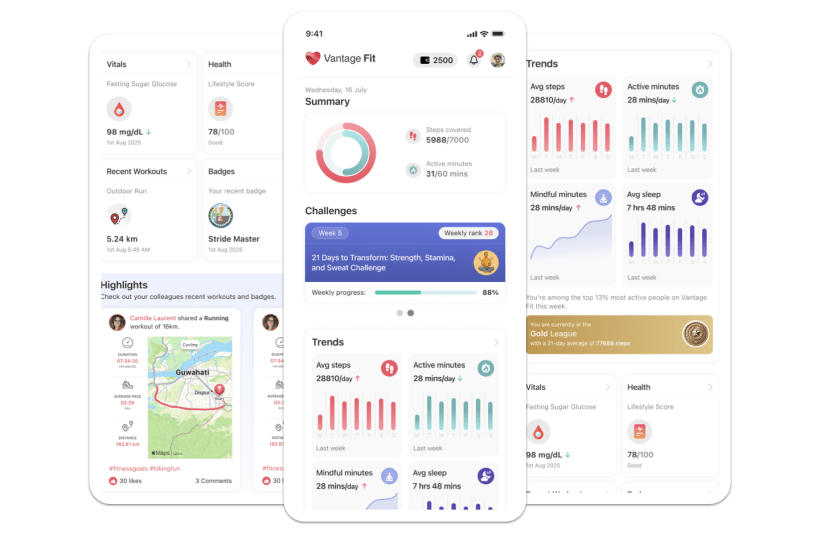
Vantage Fit mobile app screens showing the daily summary with activity rings and step count, weekly trend charts for active minutes and average sleep, and a vitals card
Two colleagues reviewing health figures together on a screen in a bright office
Vitals Sleep Heart rate Weight and BMI
The health profile

What the profile actually takes.

Employees fill in what they know. Partial data still works, and the calculated numbers follow.

BMI, on four bands Illustrative
UnderweightNormalOverweightObese

Calculated from height and weight, against an ideal-weight range. No band locks a feature.

Blood pressureSystolic and diastolic, parsed from 120/80
CholesterolLevel, as the employee has it
Diabetes statusYes or no
WeightScroll picker or wearable sync
Height and waistCentimetres, once
BMICalculated, never typed
Ideal weight rangeFrom height, age and gender
Blood groupEight options
Unit preferenceKilograms or pounds
The two that get overstated

Sleep is a bedtime and a wake time.

Not a duration box to estimate into. And a phone-camera pulse reading is an awareness number, not a clinical one.

Sleep Two date pickers
Bedtime11:20 pm
Wake time6:35 am
A connected wearable's sleep coexists with manual entries and asks before it overwrites one. Each record keeps its source, so an Apple Health night and a typed night are never confused. The sleep trend graph is a Full Mode surface.
Manual override stays open on any night the wearable missed.
Heart rate Camera or wearable
Auto-synced from a connected wearable, continuously and during workouts. Or a fingertip held over the rear camera for 15 to 30 seconds, with no device at all. The result is a resting BPM reading the employee keeps.
Two minutes seated first gives a usable resting number.
The camera reading is awareness-level, not medical-grade.

It is a convenience for an employee without a wearable, and it is not a diagnostic. We do not chart it as a clinical trend. For continuous or exercise heart rate, connect a device.

Participation

The health update is another log, not a second product.

A vitals or weight update creates an activity-log entry on its own. The fuller health picture lands in the same diary as a step, against the same participation rate.

No separate form, no second submission, nothing for HR to reconcile. On Android, Health Connect imports weight, sleep, heart rate, calories and distance into the same diary.

How steps and the other 65 activity types reach that diary sits on activity tracking.

Diary · TodayAuto-created
8:42 am Weight updated 71.4 kg Activity entry
8:43 am Vitals updated 120/80 Activity entry
6:35 am Sleep logged 7h 15m Activity entry
All day Steps 8,120 Synced
Illustrative values

One diary, one participation number.

Goals

Recommended, never enforced.

The app compares current weight to the ideal range and highlights one goal. All four stay selectable.

Lose weight Reduce belly fat Gain muscle Be fitter

Activity level, from Not Very Active to Very Active, is a personal calorie input. It is not an HR targeting dimension.

Vantage Fit mobile health profile setup asking for age, gender, weight and height with opt-out toggles, beside a Lifestyle and Goals screen showing an ideal-weight scale, a BMI figure, and four goal tiles with one outlined
Every profile field carries an opt-out toggle, and the whole step can be deferred.
Personal fitness score Illustrative
68% 0 to 100, the employee's own result
Critical Seven bands Excellent

Only the employee sees the score, the band and the tips that come with it.

Optional and deeper

Skipping the HRA costs nothing.

A longer questionnaire across nine health areas returns a personal fitness score from 0 to 100% and a status band. Nothing else on this page waits on it.

Blood pressure, cholesterol, diabetes, waist, smoking, alcohol, exercise, blood group, age and BMI. The result sits on a seven-band status ladder from Critical to Excellent, with tips against whatever scored low. Calorie targets use the basic profile, not the HRA. No feature is gated behind finishing it. Retake it whenever something changes.
The HRA is not available in Lite Mode, and neither are vitals, sleep or My Health. Lite Mode is steps only.
Who sees what

The employee owns the record.

Employee Everything, on their phone

Vitals, sleep, weight history, BMI, goals, HRA result and tips. Theirs to edit, retake or leave blank.

HR admin Aggregate counts only

How many people completed the HRA, never what any one of them answered.

Lab reports A separate, gated pipeline

Premium, with BAA provisions for HIPAA compliance covering it. HIPAA-guideline aligned, not a platform certification. See health data upload.

Customer results

24

Average BMI tracked across the Tata Motors program.Verify

~20%

Of employees completed the HRA in a single-cohort read. It is voluntary, and that is what voluntary looks like.Verify

Both figures come from one program each. Neither is a platform average.
An employee running outdoors on a marked track during the workday
Rollout questions

Three things buyers ask in week one.

Does anyone at my company see my blood pressure?

No. Admins see aggregate counts, such as how many people completed the HRA. Individual vitals, readings, bands and answers are never exposed.

Is the HRA required to get calorie targets?

No. Targets come from the basic health profile: height, weight, age and gender. The HRA is separate and optional, and no other feature depends on it.

Can employees do any of this on the web?

No. Vitals, sleep, heart rate and the HRA are mobile only. Lab-report upload is the one health surface that works on the web.

Watch a weight update become a participation number.

Thirty minutes on vitals, sleep, the HRA and what an admin can and cannot see.

Full Mode feature set Aggregate-only reporting 100+ organizations