Mindfulness and meditation
Employees finish a guided session from a 7-category library, and finishing it is the log.
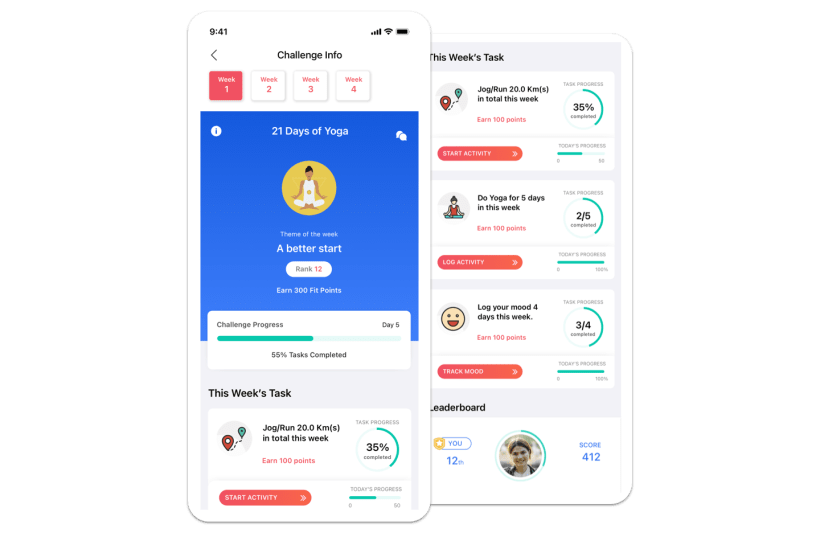
How it logsManual log · guided sessionPut mental wellbeing on the scoreboard your employees are already on, and still never see one person's mood. Mindfulness, sleep and mood check-ins run as scored tasks nobody signs up for.
They fail on three things that have nothing to do with the library.
A library only produces usage when someone decides to open it.
Anything labeled mental health asks the people who need it most to be seen.
Leadership asks what moved, and the answer is a license count.
A habit and participation layer, run as a scored challenge, at whole-workforce scale.
An EAP, counseling, a therapist network, a helpline, or a clinical screening tool. This sits under them in your benefits stack.
The fix for all three is the same: put wellbeing in the task list everyone is already enrolled in.
Not a library. Tasks with targets, Vantage Points and a completion status.
Employees finish a guided session from a 7-category library, and finishing it is the log.
How it logsManual log · guided sessionEmployees log a session, or use the 7-minute routine.
How it logsManual logLogged by hand, or synced from Apple Watch or Fitbit.
How it logsManual or device-syncedA 5-point scale with optional reasons, private to the employee.
How it logsManual logCounts only when the employee reaches the end of the content.
How it logsEvent-based, cannot be self-loggedOne daily tap, for example sleep before 11 PM.
How it logsDaily check-inAvailable task types depend on your configuration. The full set runs in Full Mode.
These sit in the same challenge as step and activity tasks, with their own targets, points and completion status.
See how mindfulness and mood tracking workThree mechanics get people in without a sign-up. Three more keep a modest logger within reach of the top until the last day.
An audience rule enrolls everyone who matches, or you add people by search or CSV upload. There is no browse-and-join flow.
Health-profile onboarding is skippable past the health connection, so weight and BMI are optional.
Steps come from Apple Health on iOS and Google Fit on Android, with no wearable required.
Wellbeing tasks earn points up to 100% of the target and no further, so five yoga sessions against a target of three still score three.
The weekly leaderboard resets each Monday, while the overall view stays cumulative.
Mood is one of six reminder types. The employee picks the time and the repeat days.
Missed daily check-ins cannot be back-filled, so set targets people can hit.
Custom habits stay in the employee's Plus menu whether or not a challenge is running.
The reason people take part in this one is that taking part reveals nothing.
From the published help doc: “Your mood data is private to you. It is not visible to your HR admin, manager, or colleagues.”
Opt-out hides an employee from rankings, but they still participate, still earn points, and still count toward their team's average.
Applying an audience filter makes the challenge visible only to employees who match it.
The audience screen returns a number and the line “The list of users is not displayed to protect individual privacy.”
Health-risk targeting requires the health risk assessment and a premium module, enabled by your account manager.
“Your HR team sees whether you are participating and your challenge rankings, but we cannot see your weight, health assessment results, lab reports, or personal health data.”
Participation, completion and per-task detail. Never a person's mood.
Challenge name, dates, privacy, week theme, task type, target value, daily or weekly, points, audience.
People who install the app mid-challenge get picked up.
Send a notification to all participants, or add a theme for an upcoming week.
Participants are enrolled automatically when it goes live.
Illustrative dataCompleted, partially completed, or missed.
Per-task scores, name, department, rank and team. Filters apply before export.
Mindful Minutes per day and average sleep per day, each with a sparkline and trend direction. Full Mode only.
A 1 to 5 rating with an optional comment, fired at completion.
There is no mood report of any kind, and no aggregate mood score.
A 2-week campaign at a Texas school district, May 6–19, 2024, in which employees engaged in 10 to 15-minute mindfulness sessions at least four times a week.
Inside a 28-day challenge with 500+ active participants, 130 employees logged their daily mood and 95 engaged in mental wellness activities.
A challenge whose stated purpose was mental wellbeing, Jun 11–24, 2025, logging 163 yoga sessions and 1,279 mindfulness minutes.
Daily mindfulness averaged 9 minutes on the Step Up & Elevate Challenge and 7 minutes on the Step & Stride Challenge, where average sleep was 7h 39m.
“Vantage Fit has helped our employees stay active, track their progress, and get rewarded — turning wellness into a daily habit that drives both health and happiness across BISD.”— Rachel Arthur, Director of Benefits & Wellness, Brazosport Independent School District
“One of the features I loved the most is the Yoga Nidra session, which helped us relax in the stress-induced environment.”Celegence, email testimonial
No. Mood data is private to the employee and never appears on a leaderboard. A mood check-in can be scored, so the score shows only that it happened.
Participation, completion and a per-task breakdown for each employee. Not a mood report, not a mood trend, and not a health breakdown by department: workforce health reporting is organization-level only.
No. An audience rule enrolls everyone who matches, or you add people by search or CSV upload. Someone added after the start scores from that date forward, so a late add gives nobody an advantage.
No. Vantage Fit does not provide counseling, a therapist network, a helpline, or clinical screening. Run it alongside the EAP contract you already hold, as the daily habit layer underneath it.
Yes. Mood, sleep and water log from the web as well as the app, and guided sessions play offline and sync later. Steps need no wearable.
Counsel can check the boundary before the first call. This is the rest of the security questionnaire.
India, the US, the EU and the UAE, chosen at signup, permanent, with no cross-region sharing.
SOC 2 Type II, with audit documentation shared under NDA during evaluation.
Account deletion is employee-initiated and OTP-verified. An admin cannot do it on their behalf.
Custom terms can be added to employee onboarding, set up by your account manager.
Employees see their own data. HR sees aggregate trends.
A 30-minute demo, built around your task mix and your privacy review.