Movement and fitness
Step count, distance and calorie count.
How it scoresAuto-tracked, no action neededA step challenge has one way to score, so the people your program exists for drop out in week one. This one runs 27 task types, with a new theme every week.
Enrollment is a rule you write, not a campaign you run.
All employees, or filtered by country, city, department, gender, age range or language. Everyone who matches is in.
There is no browse-and-join catalog, so participation never depends on a sign-up drive.
Choose enroll when active and a matching employee is enrolled the moment they become active in the app.
Step count, distance and calorie count need nothing but a phone in a pocket.
Reaching the end is what counts, and skipping through a video will not register as done.
Water, mood and meals, each with its own time and repeat days.
Most challenges reset daily tasks at midnight, so a missed check-in stays missed.
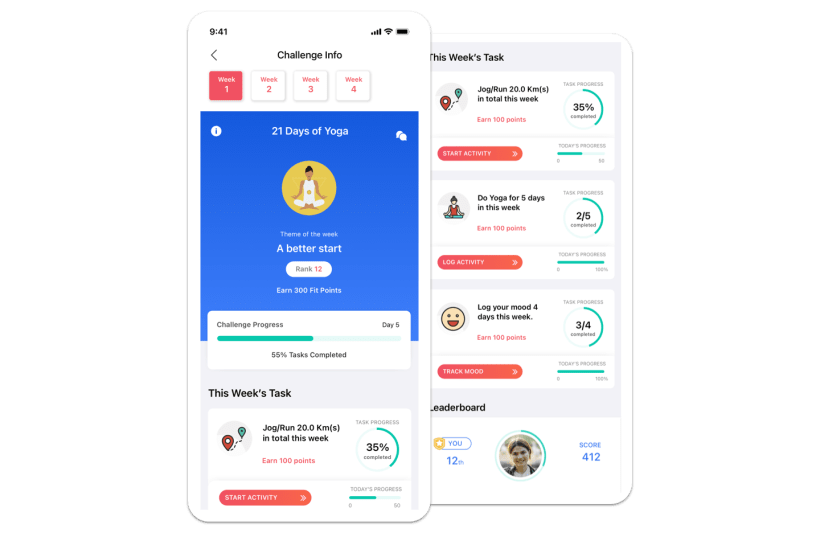
Step count, distance and calorie count.
How it scoresAuto-tracked, no action neededSquat Tracker with camera pose detection, video workouts and logged sessions.
How it scoresComplete it, or log itMeditation, mindfulness, yoga, sleep and a daily mood check-in.
Mood is never shown to admins. How it scoresManual log, a tap or a short formWater log and meal logging, the two habits people can start on a Tuesday.
How it scoresManual log, water is one tapLab report upload and health vitals, for a screening campaign.
How it scoresEvent-based, cannot be self-loggedArticles, bite-size content and book reading, a doctor-visit log, plus habits and activities you name yourself.
How it scoresComplete it, or log it27 task types in total. Availability depends on your company's configuration: Lite Mode runs Step Count only, Full Mode runs all 27. In the admin dashboard this format is called a Custom Challenge.
The leaderboard carries a weekly view alongside the overall standings, so a slow first week is not the whole season. That is what makes it read as a program rather than a points race.
Your fittest ten people cannot win this on steps alone, and an inflated log earns nothing. Here is exactly why.
Someone who logs five yoga sessions against a target of three earns points for three. Going over earns nothing extra.
Points per task are yours to author, so a step-only performer earns one task's points while somebody logging across the week's set earns across all of them.
Add people mid-challenge without gifting anyone a head start.
Unrecognized sources are rejected, implausible counts are filtered, and one primary device counts at a time.
Wellbeing logs like water, yoga and meditation are self-reported. The design answer is that over-logging earns nothing, not that we check it.
Logged 5 of 3 yoga sessions. Points for 3, which is 100% of target.
Illustrative dataThis challenge asks people to log sleep, mood and vitals, so the boundary is published rather than promised. An employee can also hide from the leaderboard and still take part, and still earn points.
Aggregate metrics, challenge participation status, leaderboard rankings, team scores, registration status, last active date and device type.
Weight, BMI and body measurements, health risk answers and risk categories, lab biomarker values, mood logs, the food diary and sleep patterns.
The score shows the check-in happened. The mood itself is never shown to admins or on leaderboards.
Vantage Fit follows HIPAA guidelines, is SOC 2 Type II, and offers secured regional data hosting in India, the US, the EU and the UAE.
Security documentation is available during evaluation.
Format, tasks, targets, scoring and weekly themes come preset with best-practice defaults, and shortening the duration trims the last week's configuration.
The week count comes from your dates. Each week takes a name, a theme logo and a theme color.
Task type, target value, daily or weekly mode, and points. Drag to reorder.
All employees or a filtered group, and any filter makes the challenge private. It sits in Upcoming and moves to Ongoing on the start date.
Creating a challenge takes 5 to 10 minutes from the admin dashboard. Challenges are created on the dashboard, not on mobile.
Score ranks by total points across every task and week, Steps ranks by step count alone, and the Team view ranks teams by average score.
Points per task, performance per week, and whether each task was completed, partially completed or missed.
Filters apply before the export.
It also carries name and email, department and country, total score and rank, and total step count.
You can see which tasks people are completing and which they are skipping, which is what makes the next challenge's mix evidence-based.
Exports are manual CSV downloads from the dashboard. There is no scheduled report delivery.
IBS Software's 28-day March to Fitness challenge reached 88% engagement, with 500+ active participants averaging 5,000+ steps a day.
IBS Software · March to Fitness · March 1–28, 2024engagement across Tata Motors' six-month Step & Stride Challenge, with 1,248 active participants, 7,275 activities logged and 7,200+ meals logged.
Tata Motors · Step & Stride Challenge · Automotivemindfulness minutes logged in the two-week Wipro Wellbeing Fest, alongside 1,409 litres of water and 8,870 squats, with 163 active users.
Wipro · Wipro Wellbeing Fest · April 7–20, 2025“The activities were engaging, catering to different fitness levels and interests.”— Shraddha Mishra, HR Generalist & Operations, Checkmarx
“We love the Vantage Fit app! The wide variety of wellness options kept our team interested week by week.”— International School of Kuala Lumpur (ISKL)
No. There is no limit on how many challenges run at once, and a single walk counts toward every challenge whose tasks it matches. The common pattern is one always-on challenge plus short bursts. Stagger the end dates so each set of results lands on its own day.
Availability depends on your company's configuration. Lite Mode runs Step Count only, so a multi-activity challenge needs Full Mode, where all 27 task types are available. A few task types are switched on by your account manager rather than self-serve.
No. Steps come from Apple Health on iOS and Google Fit on Android. Fitbit, Garmin and Samsung Watch take over when connected, and only one primary device counts at a time so nothing is double counted. A wearable is optional.
Start from a pre-built template with best-practice defaults, then adjust. The guidance the product ships with is to keep targets achievable, at a level 60 to 70 percent of participants can hit, and the mix it recommends for maximum participation is step count plus a water log plus a content task, because auto-tracked tasks complete without friction.
The leaderboard exports to CSV with per-task score columns for a custom challenge, plus name and email, department and country, total score and rank, and total step count. Employee, transaction and redemption reports export the same way. Exports are manual downloads, not scheduled deliveries.
A 30-minute demo. We will build a four-week challenge in the dashboard and open one participant's per-task breakdown.