An employee nutrition tracking app that shows its working.
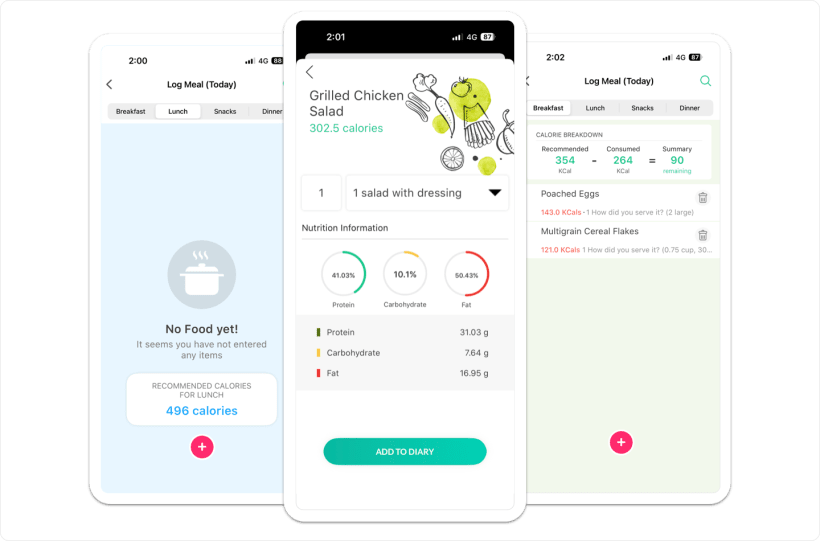
The daily target is not a round number somebody picked. It comes from Mifflin-St Jeor, an activity multiplier and the goal the employee chose, then splits across four meals. Water logs one fixed 250 ml glass at a time.


Mifflin-St Jeor, then the goal.
Four steps, and a floor that stops the number going somewhere unsafe.
Mifflin-St Jeor, from height, weight, date of birth and gender.
Sedentary 1.2, light 1.375, moderate 1.55, heavy 1.725, very heavy 1.9.
Plus or minus 550 calories a day, which is roughly half a kilo a week.
The target never drops below 1,800 for men or 1,200 for women.
Breakfast 25. Lunch 35. Snacks 10. Dinner 30.
Corporate wellness food logging usually stops at a daily total. A day is lost at lunch, not at midnight, so the target is split before the employee opens the app.
One tap is one glass. 250 ml.
The glass size is fixed, so two employees who logged eight glasses logged the same amount. That is what makes employee hydration tracking comparable across a workforce.
8 glasses = 2 litres. The default target when no challenge is running.
A few thousand foods, and a way around it.
It is being expanded. Regional dishes and home cooking are the known gaps, and we would rather name them.
A name, a calorie count, and macros if they are known. An estimate that gets logged beats a meal that does not.
Employees submit what is missing, and the team reviews it for a later database update.
Search is search, and the target is a formula you can check by hand.
Food and water logging live in the mobile app, not the web app. Neither exists in Lite Mode, which is steps and Race challenges.
Water and nutrition tasks sit in the same challenge builder as steps and workouts, and land in the same participation rate your reports read.
Three things buyers ask in week one.
Does someone have to finish the Health Risk Assessment first?
No. Height, weight, date of birth, gender, goal and activity level from onboarding are enough for a daily target and a macro split.
Can an employee log lunch from a laptop?
No. Food and water logging are in the mobile app. The web app covers challenges and leaderboards.
Does HR see what someone ate?
No. Admins see aggregates. An individual food diary is never open to an admin.
See a lunch land in the participation rate.
Thirty minutes on calorie targets, food and water logging, and the challenge tasks that read them.