Custom Challenge
Weekly themes and any mix of tasks, with teams enabled when you create the challenge.
Best fora multi-week team programYour last team challenge probably reached the people who were already active. A Vantage Fit team's score is the average of everyone on it, so the fastest way for a team to climb is to get its quietest colleague moving.
The first thing anyone says about a team challenge is that the teams will be uneven and one person will carry the score. Here is the arithmetic that answers it.
A team's score is the average of its members' individual scores. Adding inactive members pulls the average down, so a team climbs fastest when the colleague who has not started yet gets going.
It applies to admin-created and employee-created teams alike, so no team can quietly stack itself.
An admin can move a member between teams. Their individual score is preserved and both team averages recompute.
Anyone added mid-challenge scores from their join date forward, not from the start date.
Non-step tasks earn points up to 100% of the daily target. Someone who logs five yoga sessions when three are required still earns points for three.
We recommend 4 to 6 members per team, kept within one or two members of each other. Steps are accepted only from recognized fitness apps and devices, and implausibly high counts in short time periods are filtered out.
A team of three at 100 and two who never started averages 60. Five colleagues who all did 80 average 80.
Illustrative dataAn audience rule enrolls everyone who matches, immediately or when they next open the app. There is no browse-and-join flow to lose people at.
Employees find themselves on a team when the challenge starts. Enrollment, team assignment, and challenge start emails are on by default and carry your logo and colors.
Steps come from the phone through Apple Health on iOS and Google Fit on Android. Fitbit, Garmin, and Samsung Watch are supported, one primary device at a time.
Employees toggle the leaderboard between individual and team, and between weekly and overall. Weekly resets each Monday.
Leaderboard opt-out hides an employee from the individual leaderboard. Their activity still counts toward their team's average.
Daily targets reset at local midnight for each participant, so a 30-day challenge is a true 30 calendar days for everyone.
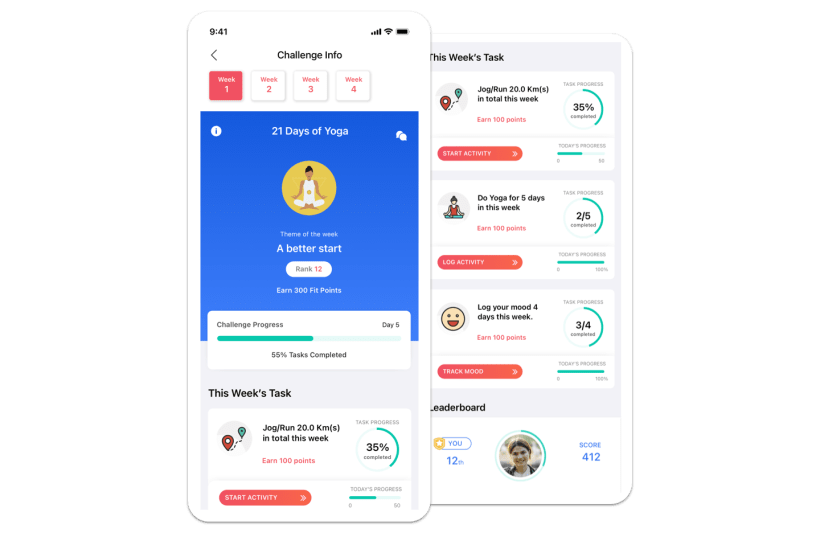
Weekly themes and any mix of tasks, with teams enabled when you create the challenge.
Best fora multi-week team programEach member advances on a shared map while teams compete on average score. Three built-in maps included.
Best fora narrative your teams follow togetherConsecutive days completed, with teams scored on the average of their members.
Best forbuilding a daily habitRace Challenge runs as an individual format only, with no team settings and no certificates. Teams are enabled at creation on Custom, Journey, and Streak.
From the dashboard one at a time, by bulk upload from a CSV or Google Sheet, or captain-led if your account manager enables it.
Maximum team size is set at creation and applies to every team, however it was built.
From the admin dashboard. Building the roster is a separate step, and bulk upload is much faster for large challenges.
Add or remove participants, move members between teams, and add a new weekly theme mid-challenge.
Mismatched emails are skipped at import. Captain-led team creation is enabled by your account manager and is off by default.
Best practice: 4 to 6 members
Who creates teamsTeam score = average of all team members' individual scores.
The Team leaderboard sits beside Score and Steps, and expands to show each member's contribution.
The per-user score breakdown gives scores by task and by week, plus task completion status.
One CSV carries name and email, department and country, total score and rank, step count, per-task scores, and team name.
Turn certificates on at creation and they generate automatically for every participant who completes, branded with your logo, seal, and signer.
Results finalize after a 3-day sync buffer. Per-task and per-week breakdowns are available on Custom challenges. Exports are a manual click in the dashboard. There is no scheduled report and no emailed digest.
engagement rate across a team challenge that ran on 43 teams
Tata Motors · Step Up & Elevate Challengeof those 43 teams reduced their average weight
Tata Motors · Step Up & Elevate Challengeaverage daily steps per participant, a 6% increase
Tata Motors · Step Up & Elevate Challengeparticipants competing across 6 in-house teams in a 30-day virtual walkathon
Landmark Group · Virtual Walkathon“People wanted to continue participating so they could see their team move up in the rankings.”ISKL (International School of Kuala Lumpur)
“Team challenges have strengthened relationships and built a sense of community among employees.”— Tara Shore, Niche Technology
A public ranking of physical activity in named teams is exactly where privacy counsel intervenes. This is the published boundary.
Aggregate metrics, challenge participation status, leaderboard rankings, team scores, registration status, last active date, and device type.
Weight, BMI and body measurements, health risk assessment answers, lab values, mood logs, food diary, and sleep patterns.
Secured regional data hosting in India, the US, the EU, and the UAE, chosen at signup, with no cross-region sharing. Vantage Fit follows HIPAA guidelines and is SOC 2 Type II.
Any audience filter makes a challenge private and visible only to its target audience. Single sign-on is available and configured with your account manager.
Security documentation is available during evaluation. IT may need to allow vantagecircle.com as a sender domain.
For a company-wide challenge, build teams from departments or locations. The rivalries already exist, so nobody has to be sold on them. Captain-led teams, which your account manager switches on, suit voluntary programs where picking your own side is the point. Either way, admins see every team and can rename it, edit its membership, or move a member across.
Yes. There is no limit on how many challenges run at once, employees can take part in several, and each challenge keeps its own leaderboard and its own completion criteria. Stagger the end dates by a week or more so each set of results lands on its own day.
Remove them from the participants list. They lose access to the challenge and receive no further notifications for it, their score data stays in your reporting, and their team's average recomputes across the members who remain. If someone quits on their own and wants back in, an admin can re-enroll them.
Yes. Rename it, swap the cover image, or reschedule the start and end dates, and participants are notified when dates move. You can also push a notification to everyone in the challenge, start it early, or stop it early. Stopping early is immediate and cannot be undone.
See a team challenge built in a 30-minute demo, with your own team sizes and your own departments on the board.