Device sync
Apple Health on iPhone, Google Fit or the selected Android source, plus direct Fitbit and Garmin connections.
Features · For employees
Employees can start with the phone already in their pocket. Vantage Fit brings device steps, manual activity logs, and camera-based tracking into the same participation record.
No wearable required65 activity typesOne primary step source

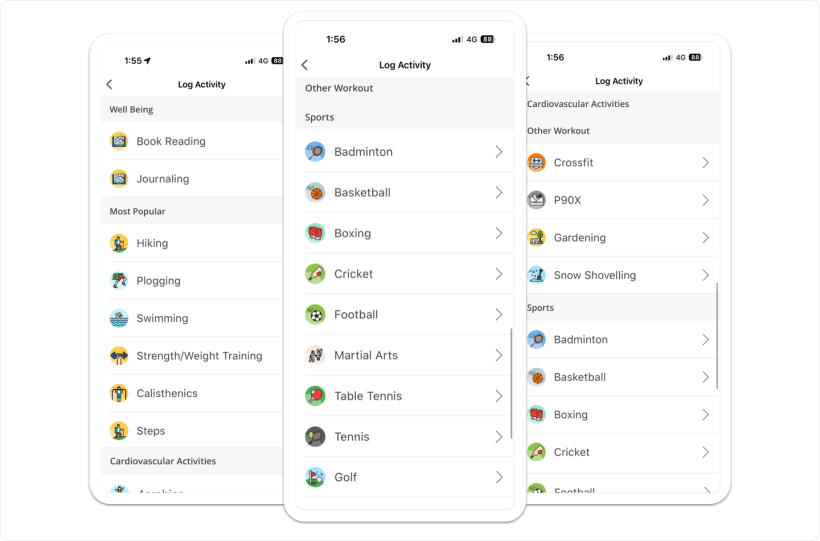
One logging surface
Different inputs resolve into the same diary, challenge logic, and aggregate participation reporting.
Apple Health on iPhone, Google Fit or the selected Android source, plus direct Fitbit and Garmin connections.
Employees record activities a phone cannot infer. Manual steps are available when the company toggle is enabled.
Squat pose detection counts movement. Finger-on-camera heart rate is awareness-level, not medical-grade.
Each valid log can count toward the same challenge and participation number.
Health Connect supports selected Android imports, not the live Android step pipeline. HR sees aggregates, not an employee's route or health sample.
Active minutes
Total steps can combine device steps, company-enabled manual steps, and steps derived from active minutes. The move_min challenge task uses the same mechanic.

Activity breadth
The same compact logging pattern covers everyday movement, structured exercise, habits, and company-specific activities.
One familiar entry flow keeps the breadth usable.
Data integrity
The system addresses common duplication patterns without making claims the product cannot support.
Minimum interval between step sync requests controls repeated reads and battery use.
A narrow 95 to 105 percent prior-day pattern within 18 hours targets specific older iOS builds.
Fitbit or Garmin replaces Apple Health or Google Fit as the primary step source, preventing double-counting.
Step capping exists in code but is disabled globally, so it is not presented as active protection.
Access boundaries
The complete activity logging surface, including custom activities and rings beyond steps.
Steps only. Custom activities, GPS, camera tools, and rings beyond steps are unavailable.
Create custom loggable or adherence activities and use activity reports.
Enable manual step entry, the active-minutes ring, overlapping-activity prevention, or Lite Mode.
Continue through Group A
Walk through device sources, employee logs, activity rings, and the aggregate view HR receives.