Admin dashboard and analytics

Participation. No spreadsheet.

See what employees logged, where participation moved, and what deserves attention in one corporate wellness dashboard.
Aggregate HR view 100+ organizations CSV and PDF outputs
Vantage Fit analytics Admin view
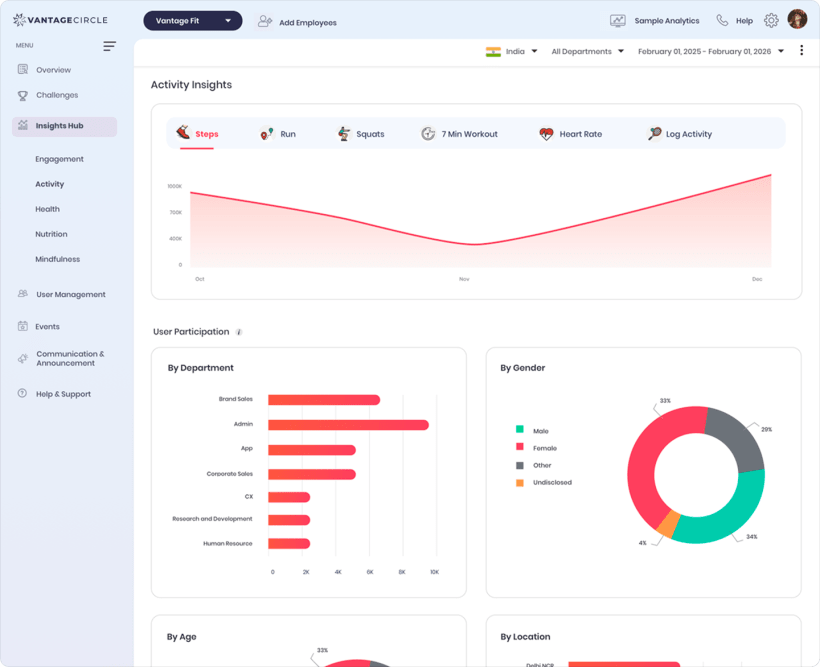
Vantage Fit admin analytics dashboard showing activity insights and aggregate participation by department, gender, age, and location
The number Participation rate Every employee log rolls into one leadership view.
Overview

Four numbers. One participation rate.

Track reach, active use, rewards spend converted from SOLI to your admin currency, and participation. Steps, workouts, nutrition, hydration, mindfulness, and other employee logs feed the same participation surface. Use preset or custom dates, then filter by country, department, age group, or gender.

Illustrative KPI preview. Figures show interface behavior, not customer results.
Enrolled users
2,140+2.8%
Active users
1,455+4.1%
Incentivization
$38.2K+1.6%
At a glance, this month Avg stepsTrend by period Active minutesTrend by period Mindful minutesTrend by period Avg sleepTrend by period
HR leader reviewing aggregate workplace analytics on a desktop monitor
Built for the review Read the signal before the leadership meeting.
Insights and actions

Know what changed. Know where to look next.

The employee wellness analytics dashboard separates interpretation from action, so every recommendation stays honest about what the product does. The result is a reviewable signal, not an automatic verdict.

Leadership Insights Read only

AI summarizes aggregated buckets into Key Insights and Focus Areas. No PII is sent, and the observations do not predict outcomes or change program settings.

Recommended Actions Rule based

Up to five priority-ordered shortcuts point admins to relevant work, such as viewing inactive employees or opening a nudge. They are links, not automations.

HR sees aggregate participation, never an individual health profile.

Reports and access

Export the detail when the meeting needs it.

Move from the overview to filtered CSV files, challenge results, reward records, or a per-campaign certificate PDF. Keep the selected detail for finance, recognition, and program follow-up.

Employee reportActive, inactive and dormant, with search and filtersCSV
LeaderboardPer-challenge rankings and resultsCSV
Transaction reportPoints and rewards with date and category filtersCSV
Redemption reportReward redemptions and categoriesCSV
League reportAnnual-gated, contact your account managerCSV
Campaign certificatesAutomated generation and download per campaignPDF
Standard surfaces Overview, filters, actions and core reports

KPI cards, Recommended Actions, Employee, Transaction and Redemption reports, plus certificates.

Account-managed access Wellness Leagues and Health Insights

Annual access is account-managed. Health Insights also requires narrower whitelist approval.

Contact Account Manager
See it in context

Take the participation number upstairs.

Walk through the overview, filters, aggregate insights, and reports with your own HR questions in mind, instead of starting with a spreadsheet.