
Features · For HR teams

Give every quiet week a next step.

Employee wellness engagement notifications connect challenge moments to the screen where participation resumes.

40%Planning scenario only: if this share goes quiet, use communications to frame the re-engagement plan. It is not a Vantage Fit measured result.
Email preview · Challenge reminder
Vantage Fit email header logoCompany banner and accent color
Challenge starts soon

Your next log has a place to go.

Open the challenge, check the first task, and start when the program begins.

Open challenge
Employee reading a workplace wellness invitation
Vantage Fit · nowYour challenge starts tomorrow

Review the first task and get ready to begin.

Tap to open Challenge ›

Lifecycle email

Twenty-nine emails across thirteen moments.

The template count covers the full user and challenge lifecycle. These named moments show when communication enters the journey.

29Email templates
13Named lifecycle moments
01Welcome
02App Introduction
03Challenge Enrollment
04Challenge Started
05Weekly Progress
06Challenge Reminder
07Weekly Summary
08Team Invite
09Challenge Invitation
10Event Confirmation
11Device Connection
12Challenge Completion
13Custom Email
StartSustainClose and extend

Mobile push

Push opens the place to act.

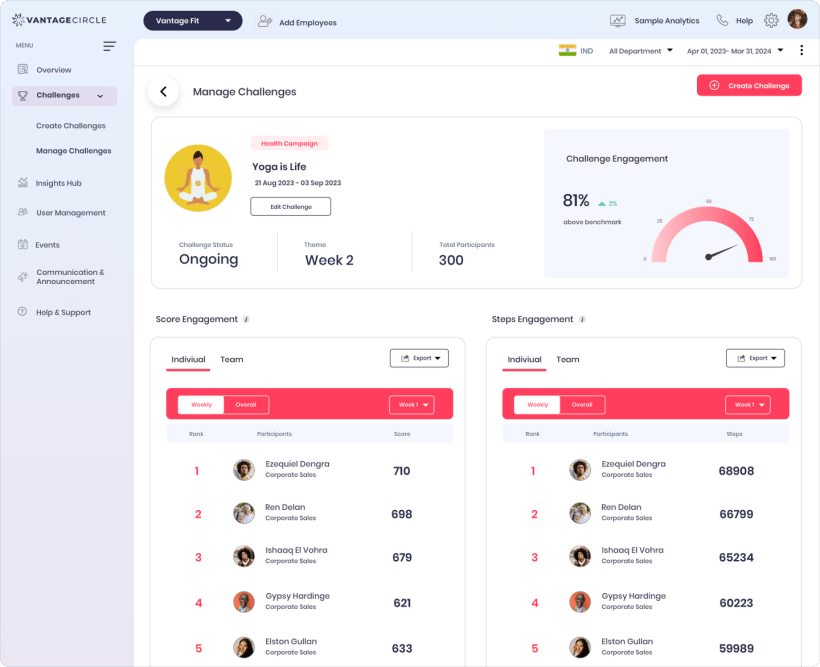
More than a notification count, deep links return employees to the challenge, team invite, leaderboard, or other relevant mobile screen.

Vantage Fit challenge dashboard that communications bring employees back to

Control boundary

Know which controls are yours today.

Admins can preview and publish common communications. Company-wide delivery rules and deeper brand changes stay mediated.

Self-serve admin

Preview, write, notify, publish

  • 1
    Preview email templatesConfiguration → Preview Emails
  • 2
    Send a branded custom email to all usersTemplate selection and attachments
  • 3
    Notify or invite challenge participantsManage Challenge → Notify / Invite
  • 4
    Publish mobile pushPreview and choose the intended audience

Account manager

Change company-wide delivery

  • 1
    Master email switch and per-type togglesSelf-serve toggles are not available today
  • 2
    Reminder timingSet 24, 48, or 72 hours before start
  • 3
    Banner, logo, colors, and program nameFull copy changes are also mediated
  • 4
    Custom terms translationsClient supplies translated text

Recommended Action

Nudge Inactive Users is a rule, not AI.

The dashboard can surface inactive-user conditions as a rule-based shortcut. It does not generate personalized copy or create an audience from a report.

Participation attentionRule-based

Nudge Inactive Users

Use the named Recommended Action to begin follow-up when participation needs attention.

DetectionRule condition
Message copyTemplated, not AI
[VERIFY] Send destination and action path before describing this as one-click or automatic.

Brand and language

Brand the system. Localize the standard messages.

Company branding makes lifecycle communication recognizable. Standard system messages follow supported language settings, while custom text needs deliberate translation.

Employees participating in a workplace wellness program
13+

Supported languages

Standard emails and system-generated push can follow the employee’s stored preference.

4

Core brand controls

Banner, logo, background or accent color, and program name apply at company level.

Email

Web delivery

Web users receive email. Do not plan web push or a web notification bell.

Company

Preference level

Notification preferences are company-level today, not per employee.

Plan the cadence

Map the next challenge from welcome to completion.

See the template lifecycle, mobile routes, admin controls, branding gates, and rule-based Recommended Action in context.

29 email templates13 moments34+ push types13+ languages