Extract the document
Read the uploaded PDF or converted image.
Features · Enterprise
For selected annual partners running health check-up programs, employees can upload a report and receive an AI-assisted summary while HR sees organization-level prevalence only.
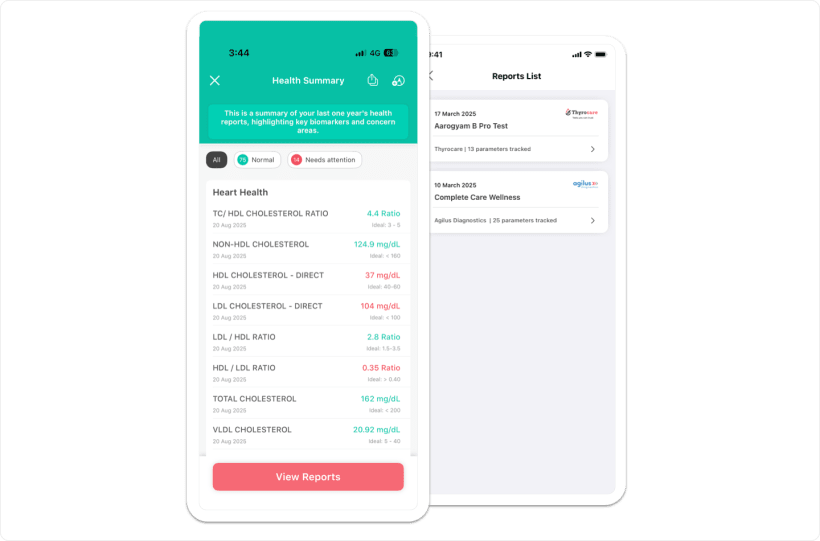

AI-assisted extraction
A clear report moves from document intake to an employee-facing summary. The employee checks the extracted context before using the general wellness guidance.
Read the uploaded PDF or converted image.
Map report labels to known biomarkers.
Interpret values against source ranges.
Present results in a readable visual view.
Offer general diet, lifestyle, and activity guidance.
Employee view
Upload works on iOS, Android, and web after the company enables the module. Report history and permanent self-delete stay with the employee.
PDF files can be up to 30 MB. Images must be JPEG or PNG and are converted for processing.
Approximate coverage. Verify the final count with product.
Metabolic and diabetes, heart, liver, kidney, thyroid, blood health and anaemia, Vitamin D and B12, and inflammation.
Only the employee sees reports, extracted values, flags, and suggestions.
An employee can remove a self-uploaded report from their history.
Source labels marked critical, alert, or abnormal are treated as high. Employees should verify extracted values against the original report.
No distance from the nearest bound.
Measured from the nearest reference bound.
Also used for critical source flags.
Vitamin D uses its own bands: deficient, insufficient, sufficient, and toxic.
The individual can view and delete their own report.
No person, report, biomarker value, or identifying export crosses the boundary.
Workforce health risk analytics
HR can review the share of the participating workforce flagged by health area. The view is not sliced by department, team, or location.
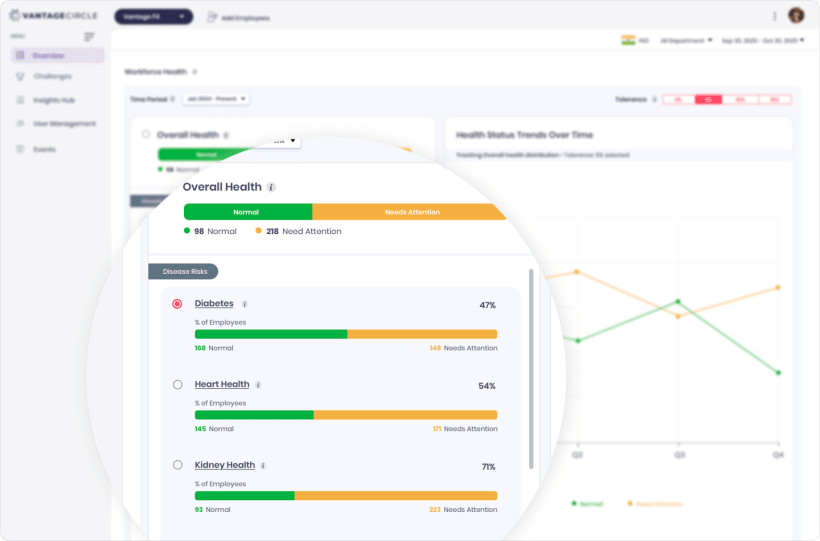
Review organization-level patterns across metabolic, heart, liver, kidney, thyroid, blood health, vitamin, and inflammation areas.
“The list of users is not displayed to protect individual privacy.” For Workforce-Health-enabled companies, discuss private risk-cohort challenges with product. Client rollout status requires confirmation.
Bulk SFTP is a one-company implementation and is not presented as a generally available intake option.
Continue the enterprise review
Selected annual partners
Review company enablement, employee intake, extraction, private summaries, and organization-level prevalence with the Vantage Fit team.