Activity sources
Phone sensors, direct wearable connections, and supported apps deliver trusted logs.
Features · Enterprise
Bring phone and wearable activity into the same participation number, then use your identity and workforce systems to put the right employees on it.
Phone sensors, direct wearable connections, and supported apps deliver trusted logs.
SAML 2.0 and workforce provisioning bring eligible employees onto the same surface.
Module A · Wearables and device sync
A phone is enough for steps. Optional connections add richer activity while one primary source and trusted-source filtering keep the participation number coherent.
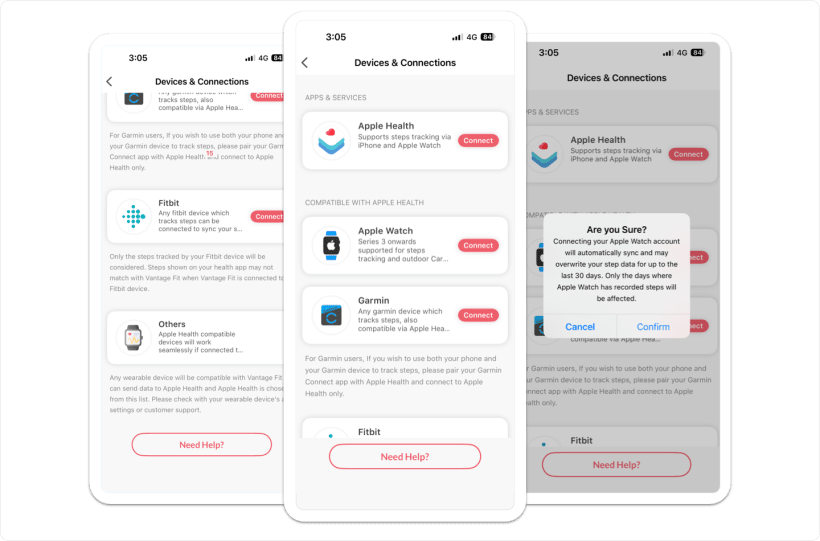
Apple Health on iPhone and Google Fit on Android provide steps. Apple Health also brings workouts, weight, calories, sleep, heart rate, and distance. Apple Watch follows its paired iPhone automatically.
OAuth sync covers steps, workouts, heart-rate zones, sleep stages, and up to 30 days of history. Refresh happens on app open or on demand.
The three-step OAuth 1.0a flow is the only real-time device connection. It supports daily and activity summaries, GPS routes, historical backfill, and payloads up to 50 MB. Tokens expire after 60 days.
Samsung Watch is an Android device option. More than 70 trusted third-party apps can write through Apple Health, including Zepp, Mi Band, Huawei, Nike Run Club, and Strava.

Module B · SSO, HRIS, and provisioning
SAML and roster connections are implementation work, not self-serve switches. Plan metadata, employee provisioning, region, and sign-in policy together.
Exchange IdP metadata with the Vantage Fit integration team. The employer’s IdP page keeps its branding; the Vantage Fit sign-in screen keeps Vantage Fit branding.
Password, SAML 2.0, Google Sign-In for GSuite domains, or email OTP. OTP is 4 digits on mobile, 6 on web, and valid for 10 minutes.
Use HR Admin CSV, scheduled SFTP, HRIS, or work-domain self-registration.
Employee-ID login and SMS OTP are available only for selected company configurations.
Shared user, company, and authentication context lets enabled R&R users reach Vantage Fit without a separate account.
Most connections are client-specific. Scope the implementation and lead time with the integration team.
Work-domain self-registration is on by default. Selected enterprise domains can be blocked from this path.
Choose India, US, EU, or UAE at onboarding. A later move requires migration.
Support a workforce across available app and system languages.
FitnessConfig controls the enabled Vantage Fit experience by company.
Continue the enterprise review
Plan both modules
See employee connections, SAML setup, provisioning paths, regions, and availability boundaries in context.