Everyone on the program, across countries.
Features · For HR teams
The participation number, without the spreadsheet.
Vantage Fit’s corporate wellness dashboard turns every employee log into four KPI cards. The one you take upstairs is participation rate.
100+ organizations Aggregate health only Date, country, department, age, gender

Participation rate
64% +5 pts vs prior period Illustrative Overview card. Not a customer result.Four numbers. One participation rate.
Overview opens on Enrolled Users, Active Users, Incentivization, and Participation Rate. Each card has a delta and a sparkline. Filters apply to the whole view.
Who used the app in the selected period.
Rewards spend, SOLI-converted to your currency.
The number you take upstairs.
KPI figures above are illustrative. Incentivization is a spend view, not a claim that monetary rewards are on for every plan.
Filters on Overview
7 days
30 days
Quarter
Year
Custom
Country
Department
Age group
Gender
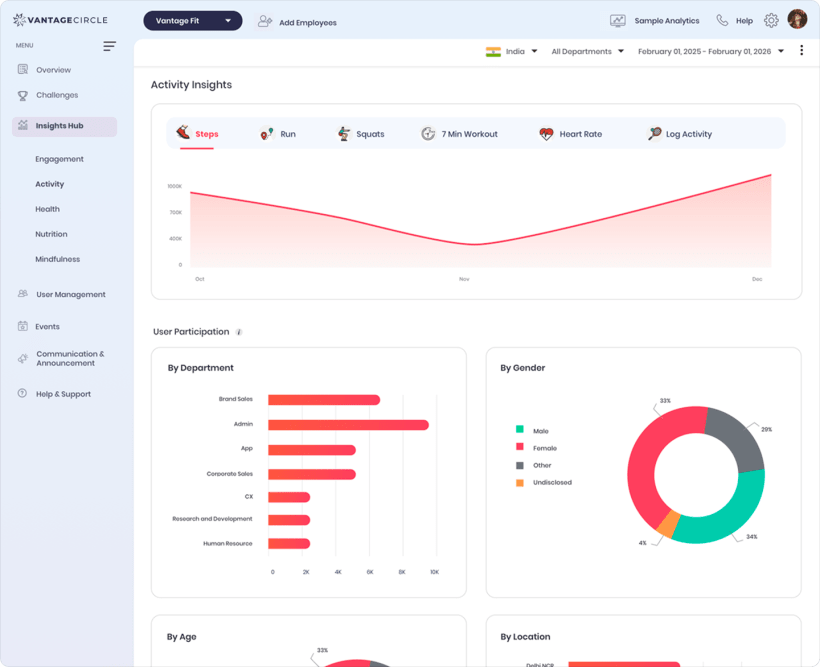
The live Overview console. Steps, sessions, meals, and sleep logs roll up here as participation.
Insights read the buckets. Actions stay links.
Leadership Insights are AI observations from aggregated signal buckets. No names, no lab values, no mood. Read-only. They do not change your config.
Leadership Insights
Two columns from an internal ML API. Only aggregated buckets leave the dashboard. Not predictive. Not auto-configuring.
Key insights
- Participation rose in Operations this quarter.
- Active users dipped after the last challenge ended.
Focus areas
- Inactive count is concentrated in two departments.
- Sleep is the weakest At a Glance trend this month.
Sample observations, illustrative.
Recommended Actions
Priority-ordered shortcuts. Links, not automations. Not AI.
- 1View Inactive Employees92 users inactive 30+ days. Illustrative count.
- 2Nudge Inactive UsersOpens the relevant admin screen. Not a one-click send.
- 3Check Health InsightsOpens only if that surface is enabled.
At a Glance this month
Each live card also carries a sparkline and trend. Figures here are illustrative.
Export the CSV. Skip the score report.
Reports sit on this same surface. There is no Score Report. Org Wellness Score is retired.

- Employee ReportActive, inactive, dormant. Search and filter. CSV.
- LeaderboardPer-challenge rankings. CSV.
- Transaction ReportPoints and rewards, SOLI-converted, date and category filters. CSV.
- Redemption ReportWhat was claimed. CSV.
- League ReportAnnual-gated CSV. Shown locked until Leagues are enabled.
- CertificatesAutomated per-campaign PDF.
Wellness Leagues
Annual. Account manager enables it. Not a self-serve toggle.
Contact Account Manager
Health Insights
Whitelist-gated. Narrower than a plain annual plan.
Contact Account ManagerAdmins see the crowd, not the person.
You get company and department aggregates. You never open an individual health profile. HIPAA-guideline aligned on this point.
Enrollment, active users, participation rate, department rollups
Challenge standings and last-active dates
Weight, BMI, HRA answers, mood, or lab values
A named health-risk list. Targeting returns a count only.

Before you roll it out
Can I see who is inactive without seeing their health?
Yes. The Employee Report shows enrollment status and last active date. It is a participation report, not a health file.
What is locked, and what is gone?
Wellness Leagues are annual. Health Insights is whitelist-gated, not every annual plan. Both show Contact Account Manager. Org Wellness Score is retired. It is not a locked teaser.
Do I still export a Score Report?
No. Use Employee, Leaderboard, Transaction, and Redemption CSVs. League CSV if Leagues are enabled.
See the number you would take upstairs.
Walk through Overview, filters, insights, and exports on a console that already looks like this.
Four KPI cards
Participation rate
CSV exports
Aggregate only
Trusted by 100+ organizations.