Admin add
Search by name or email. Or upload a bulk CSV. The employee is enrolled and sees the challenge in the app.
- Search addOne person, immediately enrolled.
- Bulk CSVEmail list, previewed, then confirmed.
Features · For HR teams
Employee wellness program targeting uses country, city, department, gender, age, language, and health-risk code. A targeted challenge is marked private. Health-risk targeting returns a count only.
7 dimensions Count only Private by default

Health-risk match
142 People. Not a name list. Illustrative count.Wellness challenge audience segmentation is these seven fields. You set them when you create a challenge. Activity level is not a targeting dimension. Health-risk targeting uses codes and categories, not a named roster and not an arbitrary biomarker cutoff.
Categories, not a high-cholesterol name list. Standard filters are self-serve. Health-risk code needs Workforce Health.
When you target by health-risk code, the wizard shows how many people match. It does not show who. That is how HR aims the same participation surface without opening a health file. The challenge is marked private so people outside the filter never see it.
The list of users is not displayed to protect individual privacy.
No name list. No export of identities. No individual HRA, labs, or mood answers on this screen.
Illustrative match count. Filters shown are labels, not a live query.
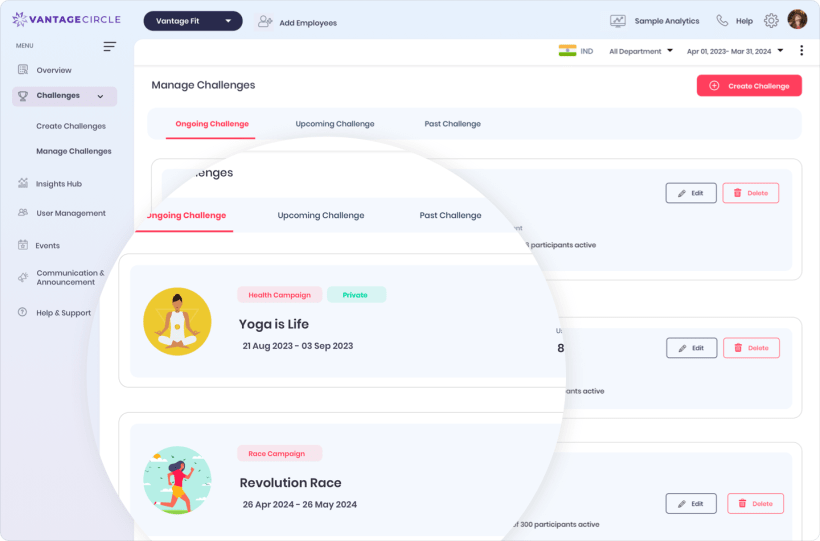
Supporting shot. Targeting happens in the create flow. This is the campaign the audience lands in.
Employees do not self-join. You add them, or the audience rule enrolls everyone who matches. The same logs still count toward the challenge. The cohort is smaller. Late joiners score from the join date forward.
Search by name or email. Or upload a bulk CSV. The employee is enrolled and sees the challenge in the app.
Set the seven filters. Matching employees are enrolled. A targeted challenge is automatically marked private.
Country, city, department, gender, age, and language are standard. Health-risk code is whitelist / premium. It is available only to Workforce-Health-enabled companies.
Contact Account ManagerNo. Health-risk targeting returns a count only. The list of users is not displayed to protect individual privacy. No screen or export exposes identities.
No. Employees do not self-join. An admin adds people by search or CSV, or an audience rule matches and enrolls them. Browse-and-join and QR join are not live.
Leaderboard score counts from the join or add date forward. There is no retroactive credit or penalty.
Walk through a private challenge, a count-only health-risk filter, and late-join scoring on a console that already works this way.