Covering the whole arc, from the account being created to the certificate at the end.
Features · For HR teams
Quiet employees do not need another all-hands email.
Employee wellness engagement notifications run on 29 branded templates, 34+ push types and one shortcut that finds who stopped logging.
Branded per company
13+ languages
Quiet-employee framing, not a Vantage Fit measurement

Co
Your company wellness
EN
Challenge reminder
Step Into Spring starts Monday
Your team is enrolled. Open the app before the first day so your steps count from hour one.
View the challenge
Sent in the recipient's language
Company branding applied
Three channels, one company voice.
Every send carries your logo, your accent colour and your program name, and arrives in the language on the employee's profile.
iOS and Android, each deep-linked to the screen it is about rather than the home tab.
Chosen per employee. Custom terms and conditions need translations you supply.
On the web app, employees get email
Push notifications are mobile. Plan the web audience around the inbox.
Preferences are set per company
Employees do not pick their own notification types. Reach is decided once, for everyone.
Thirteen moments on one employee's arc.
These are the triggers, not the template count. Each one fires off something the employee did, or something you published.
WelcomeAccount created
App introductionJust after signup
Device connectionFirst login, nothing connected
Challenge enrollmentAdded to a challenge
Challenge invitationInvited by an admin
Challenge reminder Off by default24, 48 or 72 hours before start
Challenge startedDay one
Team invitePlaced on a team
Weekly progressScore and rank, mid-challenge
Weekly summarySteps, calories, active minutes
Event confirmationAfter an RSVP
Challenge completionFinal standing and certificate
Custom emailWhenever you send one
Reminders are off until you ask
Challenge Reminder ships disabled, because a nudge every week of a long program reads as noise. Turn it on for the challenge where participation is slipping, not for all of them.

What you send today, and what your account manager sets.
Sending is self-serve. Configuring what the system sends on its own is not, for any customer.
You send it
Four things, all live, all without a ticket.
- Preview emailsConfiguration, Preview Emails. See each template with your branding on it.
- Send a custom emailCommunity, Send Custom Email. Subject, body, attachments, template selection.
- Notify or invite a challengeManage Challenge, Notify or Invite. Goes to that challenge's participants.
- Publish a push notificationCommunity, Publish Notifications. Write, choose the audience, preview, send.
They configure it
A process gate for every customer, not a contract tier you can buy out of.
- Per-type email togglesTurning Weekly Summary off, or Challenge Reminder on.
- The master email switchSilences all Vantage Fit email when you run comms yourself.
- Banner, logo, colours, program nameApplied per company. Deeper copy changes are mediated too.
- Reminder timing24, 48 or 72 hours before a challenge starts.
The inactive-user shortcut is a rule, not a robot.
The dashboard surfaces up to five Recommended Actions, ordered by priority. Two of them are about the people who stopped logging.
View Inactive Employees
Opens the Employee Report filtered to people with no activity in the last 30 days.
Nudge Inactive Users
A rule-based shortcut into the admin screen for reaching that group. It is not a confirmed one-click send.
Send path: verify
Check Health Insights
Only appears when that surface is enabled on your account.
Rule-based, and templated
Recommended Actions are triggered by thresholds in your own data. Email and push copy comes from templates. Neither is AI-written, and neither picks a segment out of a report for you.
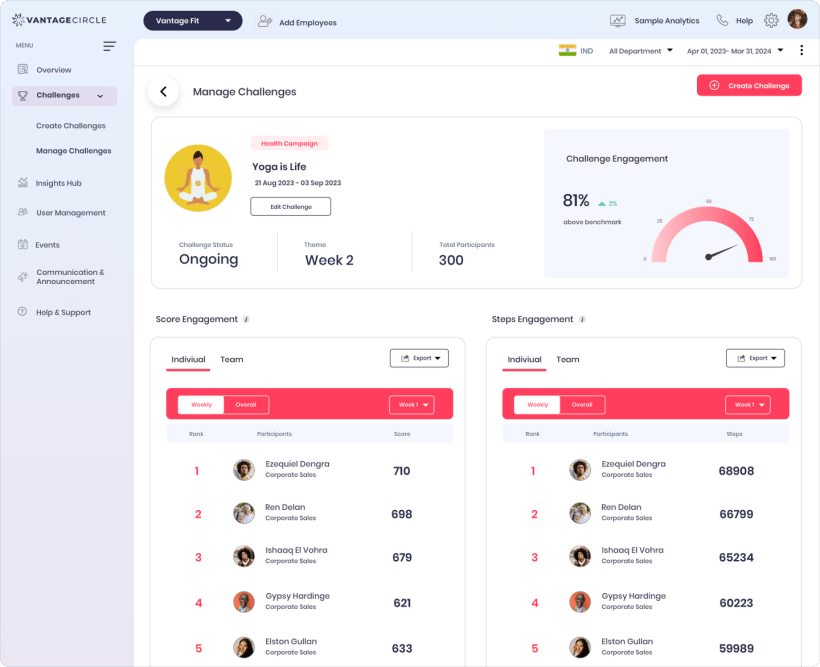
Recommended Actions sit on this dashboard, next to the participation number they are reacting to. Figures inside the screenshot are sample data.
See what lands in an employee's inbox.
We will preview the templates with your branding, publish a push, and walk the inactive-user shortcut.
29 email templates
34+ push types
13+ languages