A theme per week, any mix of task types.
Drag-and-drop tasksFeatures · For HR teams
The wellness challenge builder, live before lunch.
Pick a format, drop in tasks, set dates and audience, publish. What employees log against it lands in the participation rate you already report.
Five self-serve formats
27 task types
Certificates on completion
Steps
1Format
2Details
3Tasks
4Teams
5Audience
6Rewards
7Publish
Choose a format
You can change tasks and dates later.
CustomWeekly themes, any tasks
RaceSteps, one leaderboard
JourneyMilestone map
StreakDaily target held
E-MarathonSteps to distance
TemplatesPre-set and ready
Browse templates Tasks, targets and scoring pre-set
Step 1 of 7
Continue
Five formats. One wizard.
Custom is the flexible one, and the only format with drag-and-drop task config. The other four are fast on purpose.
One step target, one leaderboard.
Steps onlySteps move each employee along a map.
Built-in mapsA daily target, held day after day.
Daily targetsSteps convert to distance for an event.
1,000 steps = 1 km
On Lite Mode
Race on step count, deployable in one to two days.
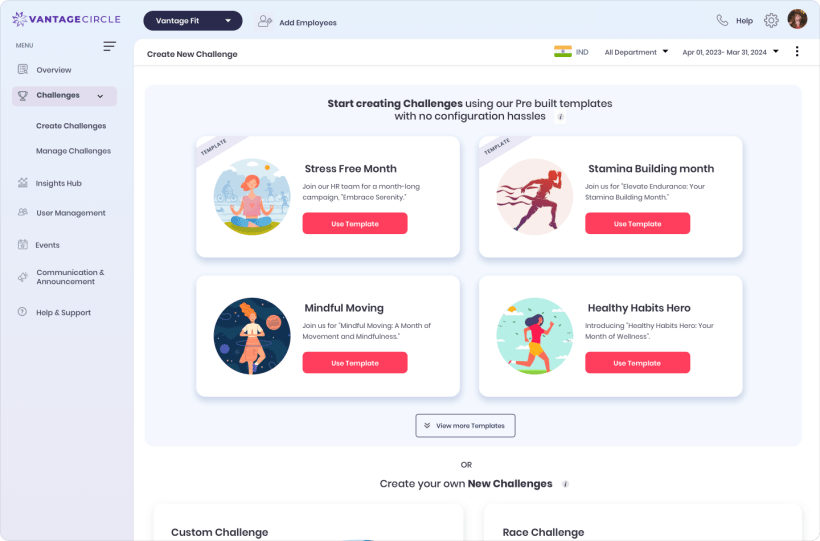
Create Challenge opens on the template library, with the formats below it.
Twenty-seven task types. One score.
The picker holds the same catalogue the app logs against. Give each task a target, daily or weekly, and points.
Add tasks
4 selected · 27 available
Movement
Step count
Distance
Calorie count
Active minutes
Manual steps
Fitness logs
Strength
Aerobics
Yoga
Squats
Mind and focus
Meditation
Mindfulness
Mood log
Book reading
Nutrition and hydration
Water log
Meal log
Health metrics
Sleep
Weight
Heart rate
Health vitals (HRA)
Lab report
Doctor visit
Content
Video workout
Content reading
Bite-size content
Habits and programs
Adherence habit
Custom activity
Smoking cessation
Target and points set per task
Illustrative selection
Reordering is a Custom Challenge feature
Drag-and-drop and weekly themes belong to Custom. The other four run on a fixed task, which is why they publish in minutes.
Custom activities are yours to name
Build employer-branded activities and adherence habits under Configuration, then add them like any other task.
Mood can be asked for. It cannot be read.
A challenge can ask employees to check in. The answers stay with the employee: no admin screen, export or leaderboard shows them.
Start from a shape that already works.
The template library sits beside the format picker, with tasks, targets and scoring pre-set. Journey adds 2+ built-in maps.

Built-in journey map
Backpacking through Europe
Nine stations, cumulative. About 50 km on foot, illustrative.
70,000steps
Built-in journey map
Journey to 7 Wonders
Seven landmarks, cumulative, with points at every stop.
50,000steps
Custom Journey artwork is scoped work: annual contract, sufficient order value, a designer and a setup call.
Talk to an account managerThe setup every format shares.
Whichever format you pick, the same six fields follow it to publish.
- Name, description, bannerWhat employees see on the card.
- Start and end datesLocalised, so daily targets reset at local midnight.
- Privacy and target audienceApply any filter and the challenge turns private.
- Teams and maximum team sizeThe average of member scores, never the sum.
- Point rewardsPer task, per milestone or for final standings.
- CertificateLogo, seal, signature, signer name and designation.
Six states, plus your override.
Start and end run off your dates. Overrides cover the week that does not go to plan.
Not processed
Not started
Started
Ended
Manually stopped
Purged
RescheduleMove the start or end date.
Force startGo live today.
End todayStop now, without awarding points.
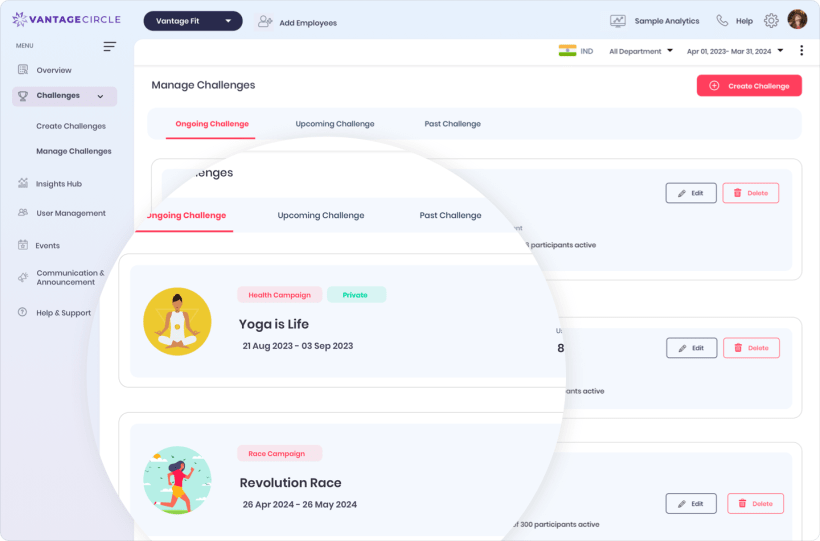
Campaign management, where a live challenge is rescheduled or stopped.
What you publish yourself, and what needs a call.
Worth knowing before your first planning meeting, not after it.
- All five formatsCustom, Race, Journey, Streak, E-Marathon
- The template libraryIncluding the built-in Journey maps
- Tasks, teams, audience, certificatesEvery field in the wizard
- Monetary point rewardsLive for one company today, not a default
- Custom Journey template designAnnual, sufficient order value, designer and setup call
- Employee-created teamsOff by default. Admins build teams
- Level, Marathon Event, Weight BurnRun for you, not built in this wizard
- Training PlansSelect-partner programs employees enrol in themselves
- Custom scoring formulasSet on your account, not per challenge
Before your first build
How long does the first challenge actually take?
A Race from a template is minutes: name, dates, audience, publish. A multi-week Custom takes longer, because you write the weekly themes as well as the targets.
Does anyone need a wearable?
No format requires one. Steps come from the phone or a connected device, and everything else is logged in the app.
Can I change a challenge after it starts?
Yes. Edit details, add a theme for a week that has not begun, add or remove participants, reschedule, force start, or stop it early.
Publish your first challenge on the call.
Thirty minutes in the wizard, against your own headcount and dates.
Five self-serve formats
27 task types
100+ organizations