
Features · For HR teams

Re-engage the quiet ones, automatically.

Vantage Fit employee wellness engagement notifications fire on enrollment, start, progress, and completion. When a challenge starts, the people who stopped logging get a reason to come back.

29 email templates 34+ push types 13+ languages

Illustrative branded template. Banner, logo, and colors are set per company.

29 templates. 13 named moments.

Lifecycle emails cover the full arc of a challenge and a user. Each one triggers on a named moment, not on a calendar you maintain.

WelcomeApp IntroductionChallenge Enrollment Challenge StartedWeekly ProgressChallenge Completion Challenge ReminderWeekly SummaryTeam Invite Challenge InvitationEvent ConfirmationDevice Connection Custom Email

Preview every template yourself under Configuration, Preview Emails. Reminder timing is configurable at 24, 48, or 72 hours before start, through your account manager.

Employees gathered around a table reading a program invitation

Self-serve today, account-manager for the rest.

Day-to-day sends are yours. Switches that affect the whole company go through your account manager.

Self-serve

You can do this now

  • Preview templatesConfiguration, Preview Emails.
  • Send a custom branded emailCommunity, Send Custom Email. Attachments and template selection included.
  • Notify or invite in bulkManage Challenge, Notify and Invite.
  • Publish pushCommunity, Publish Notifications, with preview and audience selection.
Account manager

A process gate, not a tier

  • Master email switchAnd per-type toggles. Self-serve toggles are on the backlog.
  • BrandingCustom banner, logo, background and accent color, program name. Full copy changes are mediated too.
  • Reminder timing24, 48, or 72 hours before a challenge starts.

The quiet 40% gets a nudge, not a campaign.

Every program has a silent middle. Call it the quiet 40%. That figure is a framing device, not a Vantage Fit statistic, and the fix is a rule, not a blast.

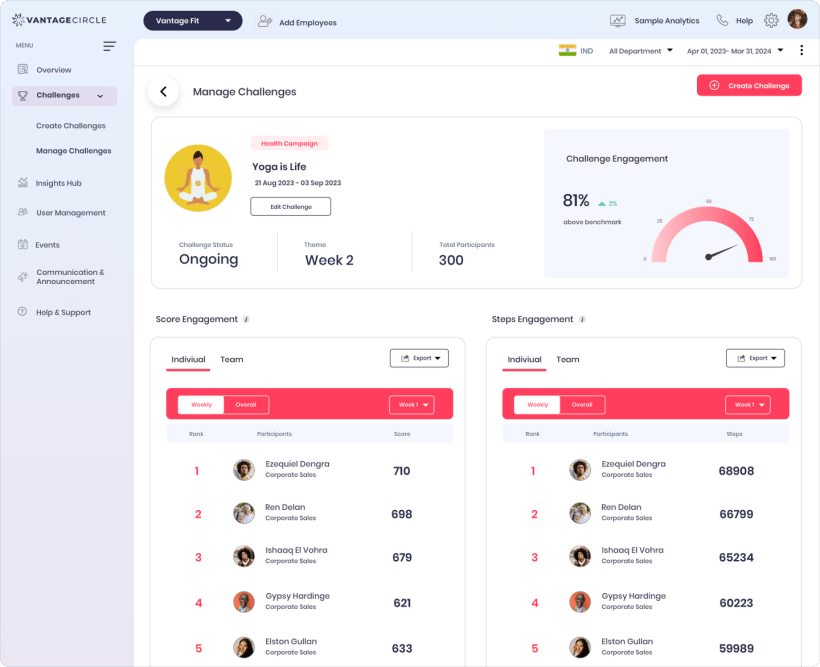
Vantage Fit challenge dashboard where Recommended Actions surface inactive users
Recommended Actions live on the admin dashboard. Links, not automations.
1
View Inactive Employees 92 users inactive 30+ days. Illustrative count. Opens the participation report, not a health file.
2
Nudge Inactive Users A named, rule-based Recommended Action. The send path is being verified, so treat it as a shortcut to the right admin screen, not a confirmed one-click send.

Nudge copy is templated, not AI-personalized. Notification preferences are company-level, and on web the nudge arrives as email.

13+

languages across lifecycle email and push. Custom terms and conditions need client-provided translations.

Before you hit send

Can I switch one email type off myself?

Not yet. The master email switch and per-type toggles are account-manager mediated today. Self-serve toggles are on the backlog.

Are the nudges written by AI?

No. Recommended Actions are rule-based, and email and push copy is templated, not AI-personalized.

Do employees on the web app get push?

No. Push notifications with deep links go to the iOS and Android apps. On web, employees get emails.

See what your quiet employees would get.

Walk through the template library, the push console, and a nudge rule on a live console.

29 email templates 34+ push types Rule-based nudges 13+ languages

Trusted by 100+ organizations.