Food and water logging live in the app. The web app does not carry either one.
Features · For employees
Meals and water, on the same count as a run.
Vantage Fit’s employee nutrition tracking app sets calorie and macro targets from real BMR math, then makes logging lunch or a glass of water a few seconds of work. It is the habit employees log most.
Mifflin-St Jeor targets Each water tap is 250 ml Full Mode, mobile only

Fixed glass size
1 tap = 250 mlTargets from BMR, not a template.
Mifflin-St Jeor estimates the baseline. A Harris-Benedict multiplier adjusts for the employee’s own activity level, from ×1.2 sedentary to ×1.9 very heavy. The goal then shifts the target by at most ±550 calories a day, about half a kilo a week, and floors hold at 1,800 for men and 1,200 for women.
| Goal | Protein | Carbs | Fat |
|---|---|---|---|
| Maintain | 30% | 50% | 20% |
| Gain | 40% | 40% | 20% |
| Lose | 30% | 40% | 30% |
| Lose Belly Fat | 40% | 30% | 30% |
25%Breakfast
35%Lunch
10%Snacks
30%Dinner
Every meal gets its own budget, not just the day. Targets come from the basic onboarding profile: height, weight, date of birth, gender, goal, activity level. The full health risk assessment is not required.

The daily view: target, meals in, resting and active burn, and the deficit or surplus spelled out.
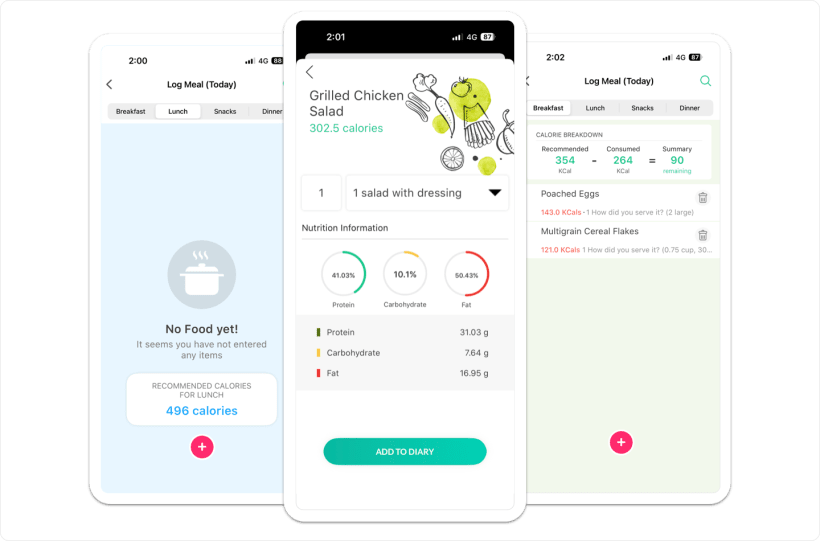
Log a meal in seconds. Or just type it.
Pick a mealtime, search, set the serving, and the entry lands with calories, protein, carbs, and fat against the day’s target.
- 1Search the databaseA few thousand items today, accuracy being improved. Employees can submit missing foods for inclusion.
- 2Quick TrayFrequent foods re-log with a single tap. Breakfast stops taking effort by week two.
- 3Manual entry, no dependencyName plus calories and macros. If the database misses a regional dish, the log still happens.
- 4No AI claims hereAI food logging and barcode scanning are roadmap items, not live features. We do not sell them as either.
Water is one tap.
Each tap is one fixed 250 ml glass. Employees can type an exact amount in litres or fluid ounces instead, and the default target is 8 glasses a day.
1 glass = 250 ml, fixed
Default target: 8 glasses
Exact entry in litres or fl oz
Challenge tasks can set custom targets, for example Drink 3.0 L, 4 days this week. A glass counts toward participation the same way a run does.
Where this lives.
Lite Mode is steps. Nutrition and hydration logging switch on with the full feature set.
Admins see aggregates. No one in HR opens an individual’s food diary or water log.
Before rollout
Is the food database comprehensive?
No, and we say so. It holds a few thousand items with accuracy being improved. Manual entry covers any gap, and employees can submit foods for inclusion.
Is the health risk assessment required for targets?
No. Calorie and macro targets calculate from the basic onboarding profile: height, weight, date of birth, gender, goal, and activity level.
Can HR see what an employee ate?
No. Admins see company and department aggregates, never an individual’s meals or water intake.
Count the habit employees already have.
Walk through target math, meal logging, and water tracking on the same surface that counts steps and workouts.
Mifflin-St Jeor targets
Meal-level budgets
250 ml water taps
Trusted by 100+ organizations.