Text and values are read out of the report.
Features · Enterprise
Turn a lab report into a private, personal plan.
Workforce health risk analytics start with one PDF from an employee's check-up. Read the availability box before you plan a rollout.
Limited availability
- Annual and premium partners running health check-up programs.
- Enabled per company by your account manager. Not self-serve.
- Live for selected organisations only today.
PDF, JPG or PNG
Employee-only values
Hidden in Lite Mode
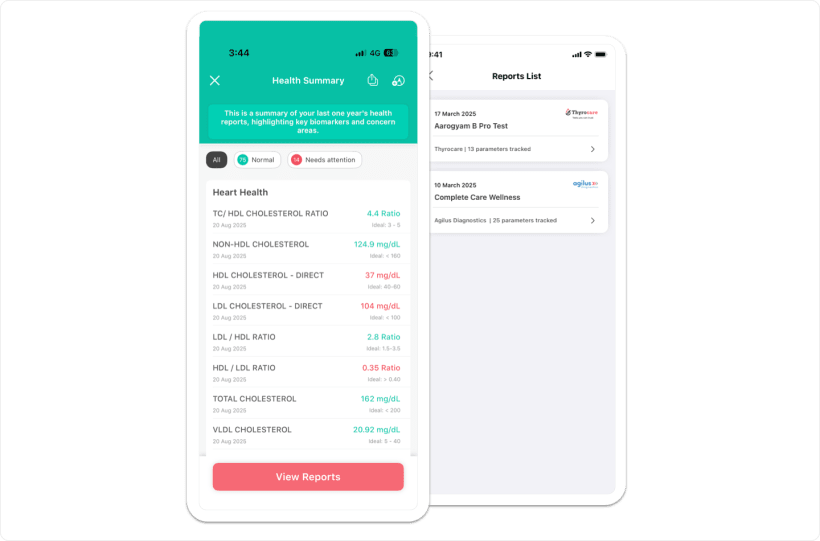
The employee's own Health Summary and report list. Sample report, and this screen belongs to the employee alone.
Upload the PDF. Type nothing.
An employee uploads from iOS, Android or the web. PDF up to 30 MB, or a JPG or PNG that gets converted to PDF first.
Test names are corrected against a biomarker database.
Values are compared with reference ranges.
The report becomes a readable visual summary.
General wellness guidance, drawn from the flagged areas.
Extraction is the AI step. The suggestions that follow are general wellness guidance and not medical advice. The disclaimer stays on the screen, and an out-of-range value is a reason to talk to a doctor.
About 104 biomarkers, about 14 health areas.
Verify with product Other documentation says 100+, so both numbers carry an "about" until the count is confirmed.
Diabetes and metabolic
Heart
Liver
Kidney
Thyroid
Blood health and anaemia
Vitamin D and B12
Inflammation
Employees keep a history of every report they upload, and can delete one permanently.
LowInside the reference range.
MediumWithin 20 percent of the nearest bound.
HighMore than 20 percent out, or flagged critical or abnormal on the source report.
Vitamin DIts own bands: deficient, insufficient, sufficient, toxic.
HR sees prevalence. Nobody sees a person.
The admin view is the share of the workforce flagged at risk in each health area. It is not sliced by department, team or location, and no screen or export opens an individual's report.
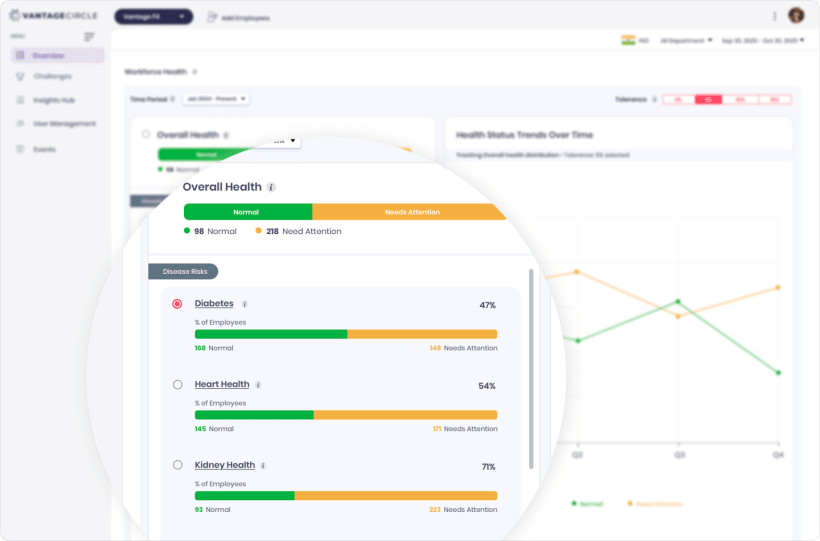
Org-level workforce health. Sample data, not a customer result.
A private challenge aimed at a health-risk cohort returns how many employees match.
The list of users is not displayed to protect individual privacy.
Rollout status is contradictory in our own documentation. Treat this as available to Workforce-Health-enabled companies and confirm before you plan around it.
How reports get in.
The normal path once the module is switched on for your company.
In production for a single customer. Do not plan on it as a general capability.
Lite Mode hides this feature completely. Wearable connect still works.

Before you scope it
Can our HR team see an employee's biomarker values?
No. Extracted values belong to the employee. HR sees org-level prevalence per health area, and there is no export that reveals a person.
Is this a diagnosis?
No. Suggestions are general wellness guidance, not medical advice. The disclaimer stays on screen, and an out-of-range value is a reason to talk to a doctor.
Can we upload our diagnostic vendor's reports in bulk?
Bulk upload over SFTP is running for one company today. Ask your account manager rather than planning around it.
Find out whether your plan includes it.
We will confirm eligibility first, then walk the upload, the employee view and the org-level dashboard.
Annual and whitelist
PDF, JPG or PNG
Org-level only
Hidden in Lite Mode
Q2 2025 launch with AI analysis capability.