Features · Enterprise
Turn a lab report into a private, personal plan.
Employees upload their annual health-check report. AI extraction bands about 104 biomarkers by risk and turns it into guidance only they can see. Workforce health risk analytics for HR stops at org-level prevalence.
Annual partner module, enabled per company by your account manager. Currently limited to selected organisations running health check-up programs.
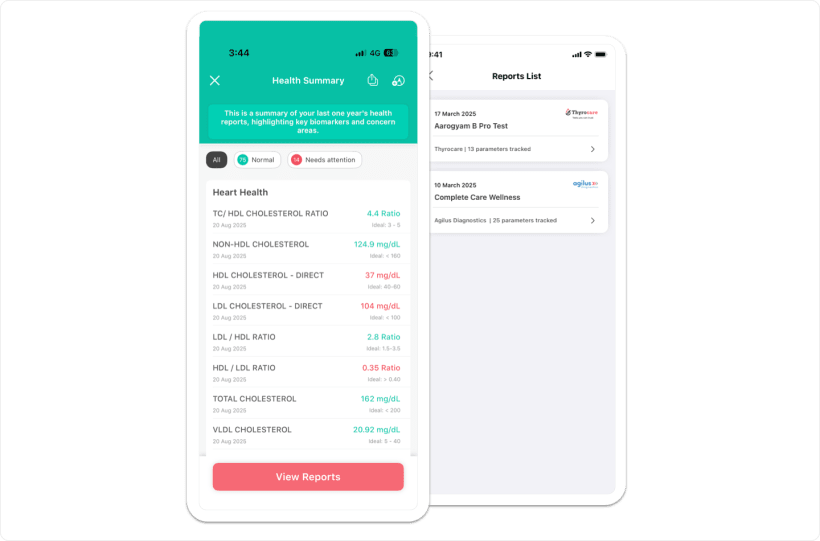
Upload a PDF. Skip the typing.
The report from your health-check partner goes straight in. Employees upload a PDF up to 30 MB, or a JPG or PNG that converts to PDF, from the mobile app or the web.
AI analysis launched in Q2 2025. Extraction reads the report; it does not diagnose.
About 104 biomarkers, banded by risk.
Coverage spans about 14 health areas, from metabolic and heart to thyroid, liver, kidney, blood health, inflammation, and Vitamin D and B12.
Private to the employee, by design.
A lab upload is another private log on the same surface as steps and sleep. It counts for the employee. It does not travel upward.
Suggestions are general wellness guidance, not medical advice. The disclaimer stays on screen next to every summary.

HR gets prevalence, never a person.
Workforce health risk analytics answer one question: what share of the workforce was flagged at risk in each health area. That is the whole view.
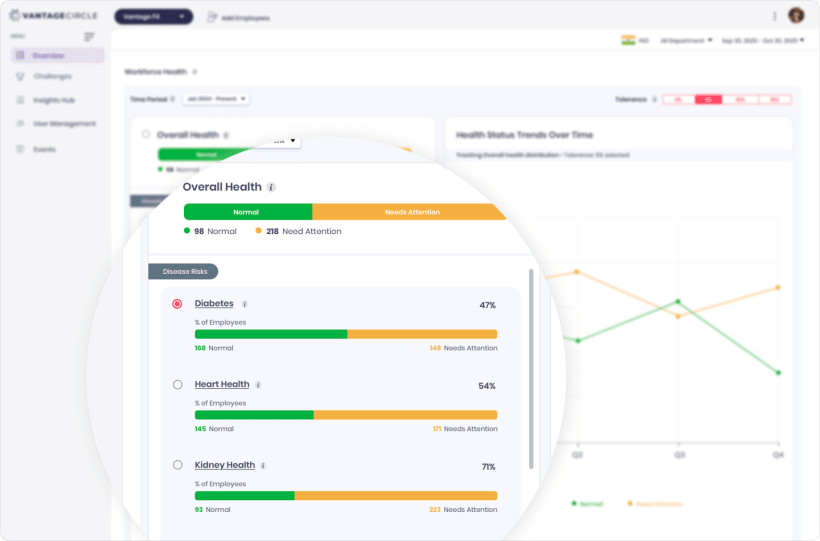
Intake is employee self-upload once enabled. A bulk SFTP intake exists as a one-company arrangement, not a standard offering.
Prevalence is reported for the whole organization. It is not broken down by department, team, or location.
Risk bands describe where a result sits against its reference range. They are not medical advice.
Enabled per company by the account manager for annual partners on health check-up programs.
Who gets Health Data Upload?
Annual partners running health check-up programs. It is a premium whitelist module, enabled per company by the account manager, and currently limited to selected organisations.
Can HR see my lab report?
No. HR sees org-level prevalence only: the percent of the workforce flagged at risk per health area. No screen or export exposes an individual report.
Is the AI summary medical advice?
No. The extraction summarizes results and bands them by risk. Suggestions are general wellness guidance, not medical advice.
Running annual health checks? Start there.
Tell us about your check-up program and we will confirm whether Health Data Upload fits your plan.
Trusted by 100+ organizations.